NeoCell Siege Heroes Mod Anti-Cheat Override Operation Process
1. First, download the anti cheat file and click on "Anti Cheat Download" below
Anti-Cheat Download: Anti-Cheat Download
https://dl.cmcccmcc.com/tools/HeroSiege.zip
2. After downloading, unzip the file to the game’s root directory, then open Steam, find Siege Heroes, right-click the game, and go to Manage. Click Browse Local Files to locate the game’s root directory.
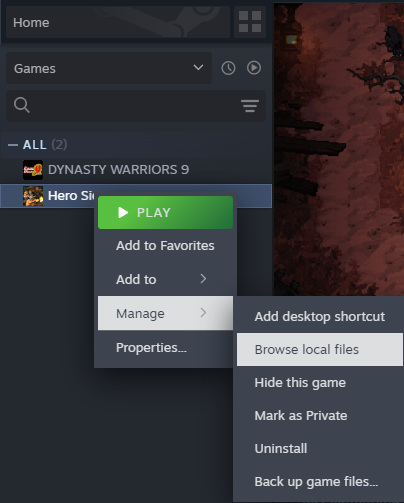
3. Copy the unzipped file EACpass.exe to the game’s root directory.
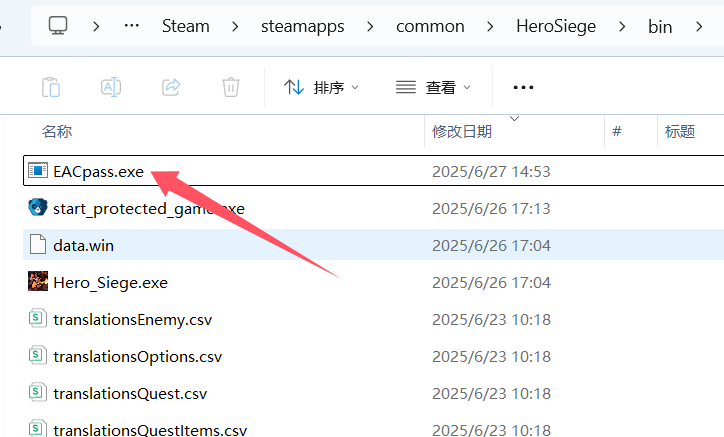
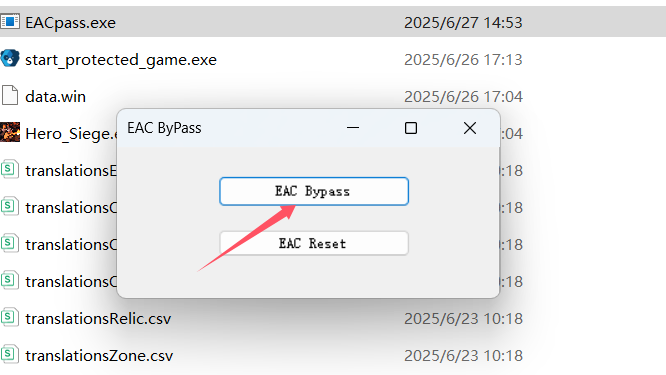
4. Run this file and click EAC Bypass on its interface.
5. After copying, click Play on Steam to start the game, then open the NeoCell software, click Add a BUFF to modify in-game.
6. To revert, click the EAC Reset button.
