NeoCell Elden Ring: Nightreign Modifier Anti-Cheat Override Operation Process
Due to the game's particularities, please select **Offline Mode** on Steam. Also, in the game properties under the "General" tab, **do not check** the option to save *Elden Ring:Nightreign* game progress to Steam Cloud. If you are no longer using any cheats or mod tools, you may re-enable this option.
1. First, download the anti-cheat file by clicking the **Anti-Cheat Download** button below, or copy the URL below into your browser to download:
https://dl.cmcccmcc.com/tools/ELDENRINGNIGHTREIGN.zip
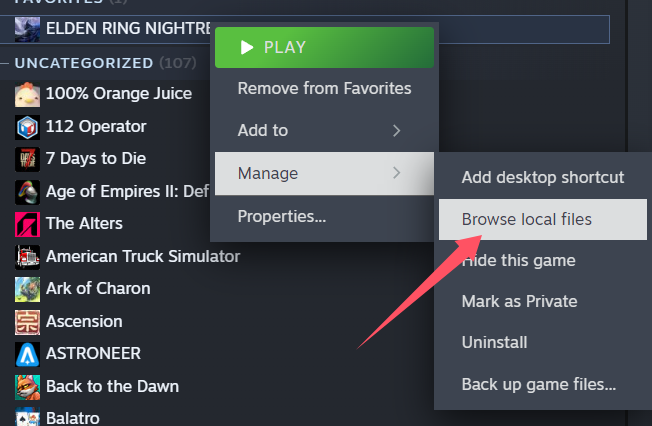
2. After downloading, extract the files to your desktop or another folder. Then open Steam, find *Elden Ring:Nightreign*, right-click on the game, and select **Manage -> Browse Local Files**. This will take you directly to the game’s root directory.
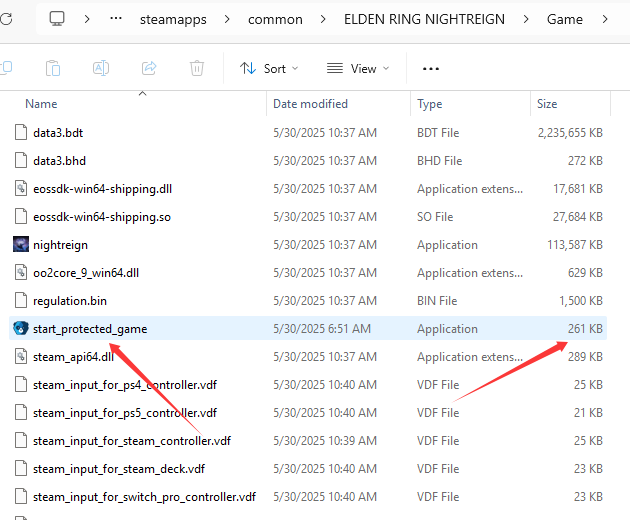
3. Next, copy the extracted file `start_protected_game.exe` into the **Game** folder within the game’s root directory and overwrite the existing file.
4. Once copying is complete, you can click **Play Game** on Steam, launch the game, then open the NeoCell software and click **Apply a BUFF** to make in-game modifications.
---
**Note:** If you need to restore the original files, go to the game properties, click on **Local Files**, and then click **Verify Integrity of Game Files** to restore them automatically. Alternatively, you can manually restore from a backup of `start_protected_game.exe` if you made one previously.
