NeoCell Monster Hunter Wilds Anti-Cheat File Operation Process
1. First, download the anti-cheat file by clicking the **Anti-Cheat Download** button below, or copy the URL into your browser to download:
https://dl.cmcccmcc.com/tools/MonsterHunterWilds.zip
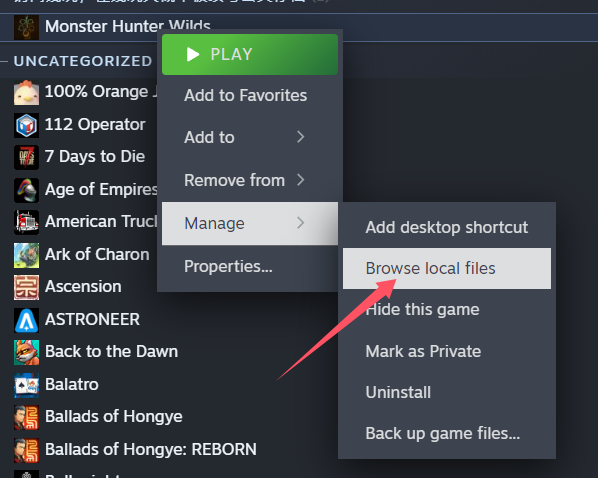
2. After downloading, extract the files to your desktop or another folder. Then open **Monster Hunter Wilds** on Steam, right-click the game, and select **Manage → Browse Local Files** to locate the game's root directory.
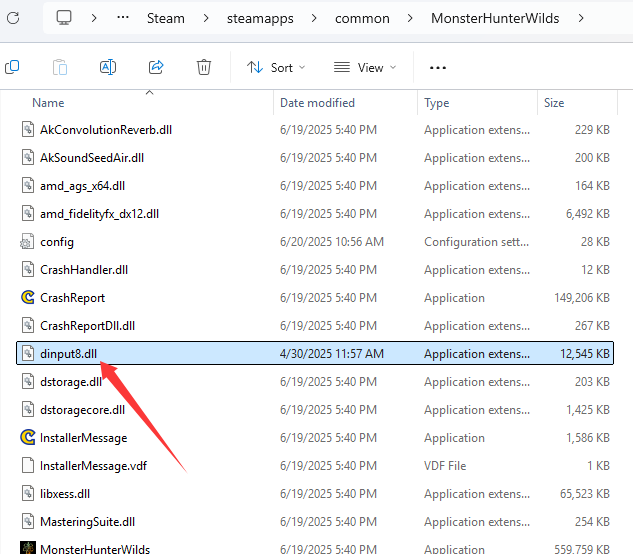
3. Copy the extracted file `dinput8.dll` into the game’s root directory.
4. Once copying is complete, click **Play Game** on Steam to launch the game. Then open the NeoCell software and click **Apply a BUFF** to make in-game modifications.
> Press the **Insert** key to hide the anti-cheat plugin interface.
