Warhammer 40,000: Space Marine 2 – Anti-Cheat Override Guide for Modifier Tool
1. First, download the anti-cheat file by clicking on the "Anti-Cheat Download" button below or copying the URL listed below into your web browser to download.
https://dl.cmcccmcc.com/tools/Warhammer 40000 Space Marine 2.zip
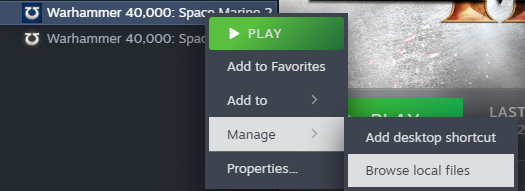
2. After the download is complete, extract it to your desktop or another folder. Then, open Steam, locate *Warhammer 40,000: Space Marine 2*, right-click and select **Manage**, then click **Browse Local Files**.
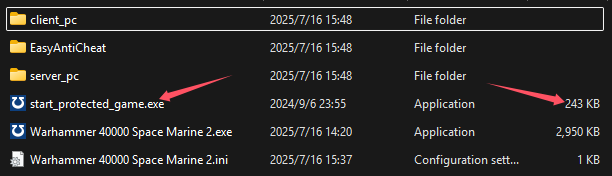
3. Copy `"start_protected_game.exe"` into the game directory under `\Game\`, overwriting the existing file (this should be in the same directory as `armoredcore6.exe`).
4. Once the copying is complete, click **Play** on the game page in Steam to start the game. After entering the game, launch the NeoCell software and click **Add a BUFF** to make modifications within the game.
