NeoCell Captain Tsubasa: Rise of New Champions Trainer Anti-Cheat Override Operation Process
1. First, download the anti-cheat file by clicking “Anti-Cheat Download” below or copying the URL below into your browser.
https://dl.cmcccmcc.com/tools/CAPTAINTSUBASARiseofNewChampions.zip
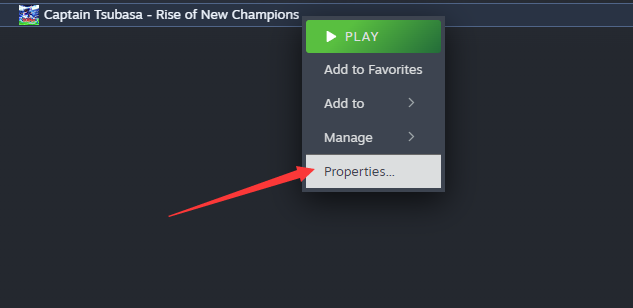
2. After downloading, extract the files to your desktop or another folder, then open Steam and locate Soccer Little Heroes. Right-click on the game and go to “Properties.”
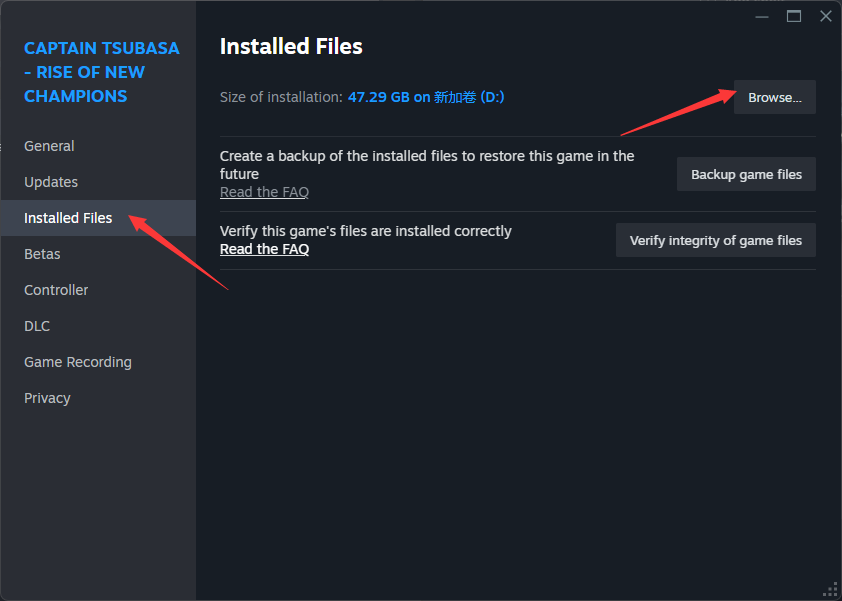
3. Click on “Local Files,” then click on “Browse Local Files” to accurately locate the game's root directory.
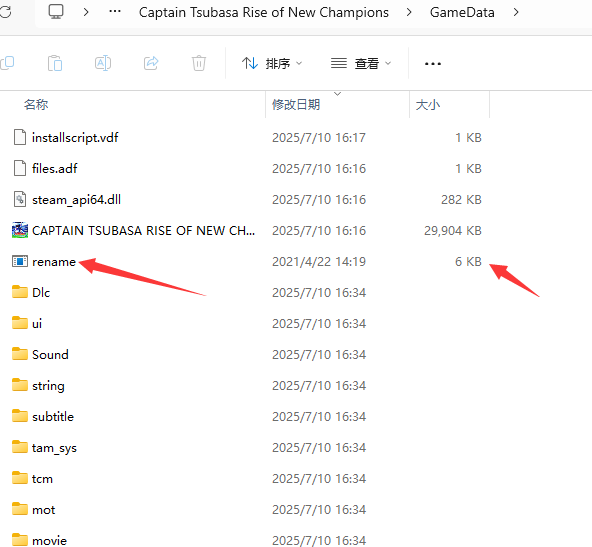
4. Copy the extracted file “rename.exe” to the game's root directory (GameData) to overwrite the existing file.
5. After copying, click “Start Game” on Steam to enter the game, then open the NeoCell software and click “Add a BUFF” to modify the game.
Note: If you need to restore the files, go to the game properties, click “Local Files,” then click “Verify Integrity of Game Files” to restore the files or back up “rename.exe” in advance.
