HOT WHEELS UNLEASHED 2 - Turbocharged Anti-Cheat Overlay Tutorial
1. First, download the anti-cheat file by clicking on the “Anti-Cheat Download” link below or copying the URL below into your browser to download it.
https://dl.cmcccmcc.com/tools/HOT WHEELS UNLEASHED 2 Turbocharged.zip
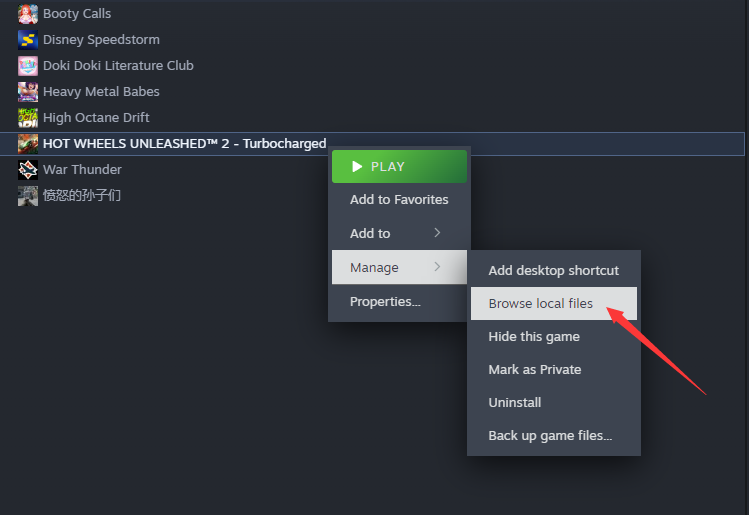
2. After downloading, extract the files to your desktop or another folder. Then open Steam, locate Windfire Wheels Unleashed 2: Turbocharged, right-click and select “Manage,” then browse local files.
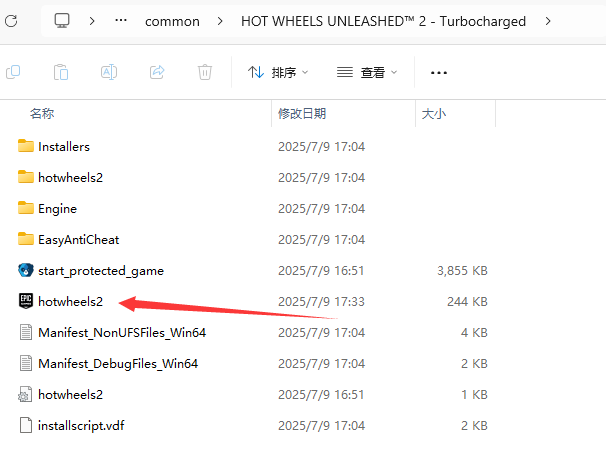
3. Copy “hotwheels2.exe” to the game directory and overwrite the existing file.
4. After copying, click “Start Game” in Steam to enter the game, then open the NeoCell software and click “Add a BUFF” to modify settings within the game.
