NeoCell ARMORED CORE VI FIRES OF RUBICON Anti-Cheat File Operation Process
1. First, download the anti-cheat file by clicking on the “Anti-Cheat Download” link below or copying the URL below into your browser to download it.
https://dl.cmcccmcc.com/tools/ARMOREDCOREVIFIRESOFRUBICON.zip
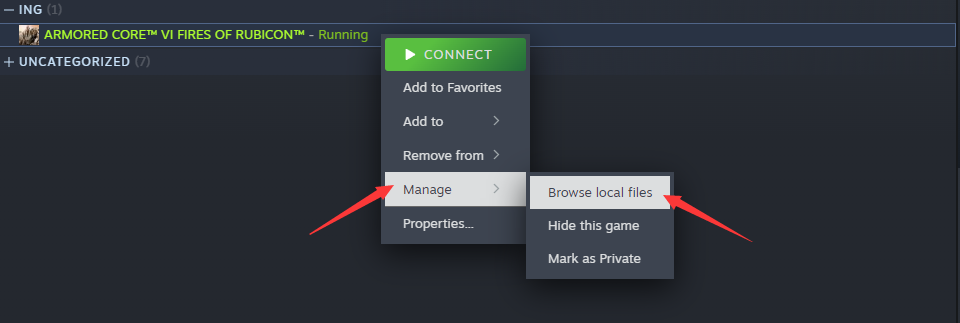
2. After downloading, extract the files to your desktop or another folder. Then open Steam, locate Armored Core 6, right-click and select “Manage,” then browse local files.
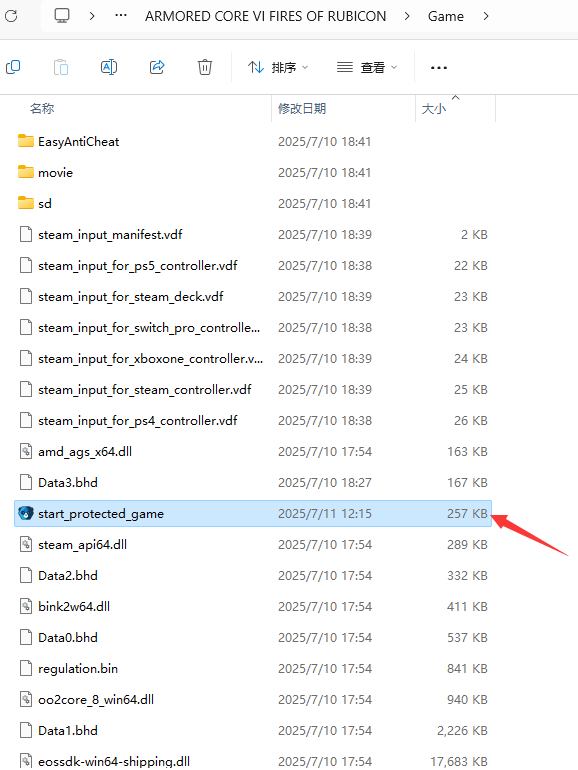
3. Copy “start_protected_game.exe” to the game directory \Game\ directory and overwrite it (it should be in the same directory as armoredcore6.exe).
4. After copying, you can click “Start Game” on Steam to enter the game, then open the NeoCell software and click “Add a BUFF” to modify the game.
